The documentation is out. I tested it. Here’s what works, what doesn’t, and where the gaps remain.
Earlier, I wrote about what we knew before testing. The docs were out, the demo video showed the flow, but hands-on experience was pending. This is the follow-up: what I found after testing across five scenarios (6, 100, 6,000, 100,000, and 1 million unmatched records).
Before you enable it, know the limits:
- Minimum 2,500 historical manual match 1-on-1 transactions per match type to train
- Prediction execution skipped for profiles with >500,000 unmatched transactions (training still runs)
- 1-on-1 matches only (no one-to-many, many-to-many)
- Enterprise Cloud Service required (not available on Standard)
Here’s what I found.
The Setup
The enablement is straightforward. Enable Predictive AI in configuration settings, then run a Train Match Prediction job on your match type.
Prerequisites from Oracle docs:
- Minimum 2,500 historical manual match 1-on-1 transactions per match type
- Only approved match types can be trained
- Only one Train job runs at a time (others queue)
I tested across five scenarios using testing data available in a test pod: under 10, under 100, ~5,000, six-figure, and seven-figure unmatched record volumes. Setup, training, and prediction generation all worked.
What Works
Non-blocking execution
This matters. When you run the internal matching process, you can now cancel it. The process no longer locks profiles that aren’t currently being matched.
Result: Your team can keep working while matching runs. For period-end close, this enables parallel workflows instead of sequential bottlenecks.
Prediction quality at small scale
Testing used production-like data across five scenarios: under 10, under 100, ~5,000, six-figure, and seven-figure unmatched record volumes.
Results:
- Under 10 records: All predicted matches surfaced
- Under 100 records: A few predicted matches surfaced
- ~5,000 records: A dozen predicted matches surfaced
- Six-figure volume: ML error, contact administrator
- Seven-figure volume: Did not run as expected
For the working scenarios, predictions surfaced matches that Auto Match rules missed. Confidence scores correlated with match quality. The human-in-the-loop confirmation flow worked as designed.
What I didn’t measure: False positive rate, precision/recall against a baseline. This was hands-on testing, not statistical validation.
The workflow is clean
Setup → Train → Auto Match (Predict runs automatically) → Review predictions → Confirm or discard.
No weird detours. Oracle built this for the actual close process.
Human-in-the-loop design
Every predicted match requires human confirmation. The system never auto-matches. The final decision rests with the user. Audit trail captures the human confirmation.
For SOX environments: The design is sound, but I didn’t test the audit trail itself. The distinction between “AI-suggested” and “user-confirmed” needs validation with your auditors before you rely on this for SOX-reconciliations.
What Doesn’t Work
Prediction visibility requires log review
Oracle’s docs say prediction execution skips profiles with >500,000 unmatched transactions. That’s a hard limit for prediction — but training still runs on those profiles.
What works: After training, the log shows which profiles were skipped and why. The Unmatched Transactions tab has a “Predictions Available” column that lets you filter records with predictions.
What doesn’t: Before you train, the UI doesn’t warn about eligibility. You won’t know if a profile has insufficient historical matches until after you run the job and check the logs.
Scale breaks down
The 100,000 scenario returned an ML error with a message to contact the administrator. The 1 million scenario did not run as expected. These weren’t profile skips due to eligibility — they were system behaviors at scale. I haven’t determined whether this is a hard limit, a configuration issue, or a transient error. The feature works at small scale, but don’t assume it handles enterprise volumes without testing your specific data.

Confidence scores without reasoning
Each predicted match shows a confidence score. Higher is better. No weight breakdown. No explanation of why this match scored 87% instead of 72%.
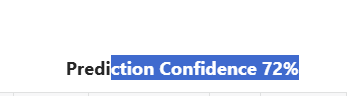
The gap: The human has the final call, but the system doesn’t explain why the data should match. You see the percentage. You see the two transactions. You don’t see which fields drove the match, which patterns the model recognized, or why this pairing over others.
For small datasets, manual review is manageable. For large exception volumes, preparers lack supporting context to feel confident in their decisions. The percentage tells you how confident the model is, not why you should confirm it.
This is an industry gap. Oracle, BlackLine, and Trintech all use ML-based matching. None of them surface weight breakdowns or reasoning to end users. This isn’t Oracle-specific. It’s where the market is today.
Scale reveals the gaps
At under 10 records (all predicted) and under 100 records (a few predicted), the feature works. At ~5,000 records (a dozen predictions), you start to notice what’s missing. At six-figure and seven-figure volumes, it failed to complete.
The feature is designed for the exception population, transactions Auto Match couldn’t handle. That’s the right design. But for organizations with massive volumes, the current explainability may not scale.
What this means:
- Under 10,000 unmatched records: predictions work, manageable to review
- 10,000-100,000: needs investigation — my tests showed ML errors, but root cause is inconclusive
- Six-figure and above: training completes but prediction execution may hit the 500K limit or encounter errors
The Steps (From Docs + Testing)
Enable the feature
- Navigate to Configuration → Settings
- Enable “Enable Predictive AI”
- Save
Train the model
- Home → Applications → Jobs
- Transaction Matching tab
- Actions → Train Match Prediction
- Select match type (approved only)
- Submit
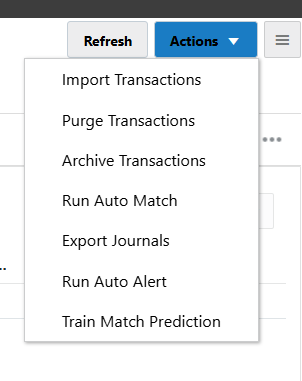
Wait for completion. Check the log. Each match process within the match type trains separately.
What Oracle docs don’t emphasize: If a match process has fewer than 2,500 historical manual matches, training skips it and moves to the next process. The log shows this. Look for “skipped due to insufficient manual matches” in the training log.
Run Auto Match
After training, import transactions and run Auto Match. A Predict Match job runs automatically after Auto Match completes.
Review predictions
- Home → Matching
- Select reconciliation
- Unmatched Transactions tab
- Add “Predictions Available” column (optional)
- Select transactions → Predict Match
- Review → Confirm or Discard
Confirmed matches become manual matches. Discarded predictions are retained for review but not matched.
The Audit Question
Oracle docs mention detailed log files for training and prediction processes. They show completion status per match process.
What I tested: Training logs show skipped profiles and reasons. Prediction logs show completion.
What I didn’t test: How predicted matches appear in SOX audit trails. The distinction between “AI-suggested” and “user-confirmed” matters for auditors. The confirmation flow creates a manual match record, but I haven’t walked through the full audit trail with SOX auditors.
Recommendation: If you’re in a SOX environment, validate the audit trail with your auditors before relying on predictions for SOX-reconciliations.
Competitor Context
Oracle isn’t first. BlackLine and Trintech have AI matching in production:
| Vendor | Feature | What’s Different |
|---|---|---|
| BlackLine | Matching Agents | Suggests new rules, improves existing ones |
| Trintech | AI Transaction Matching | Proposes matches, journals, rules with human approval |
| Oracle ARCS | Transaction Matching Assistance | Predicts from historical manual matches, 1-on-1 only |
Oracle’s scope is narrower. No rule suggestion. No journal proposals. Just match prediction from your match history.
Note: This comparison is based on vendor documentation, not hands-on testing of BlackLine or Trintech. Oracle’s narrower scope may be intentional, focusing on predictions from your existing match patterns rather than generating new rules.
What I’m Watching
After this hands-on, three questions remain:
-
Retraining cadence: Oracle recommends monthly or after significant data changes. What’s the real impact of stale models? How long before accuracy degrades?
-
Error recovery: When training fails or predictions are wrong, how do you diagnose? The log shows completion. It doesn’t show why a prediction was made or why it was wrong.
-
Performance under load: The 500K limit protects the system. But for enterprises with multiple match types at scale, what’s the real throughput during period-end?
What To Do Now
If you’re an ARCS customer:
- Start with low-risk match types. Test on profiles with good historical data (2,500+ manual matches).
- Check the logs after training. They show which profiles were skipped and why.
- Use the “Predictions Available” column to filter records with predictions.
- Validate the audit trail with your auditors before using for SOX-reconciliations.
If you’re evaluating platforms:
AI matching is table stakes now. BlackLine, Trintech, Oracle all have it. The question isn’t “who has AI?” The question is “whose AI fits your exception volume and audit requirements?”
Disclosure: This review is based on hands-on testing with data across five scenarios. Results: under 10 records (all predicted), under 100 records (a few predicted), ~5,000 records (a dozen predictions), six-figure volume → ML error (inconclusive), seven-figure volume → did not run (expected). I didn’t measure false positive rates, precision/recall against baseline, or validate SOX audit trails with auditors. For statistical validation, you’d need a controlled study with labeled data.
Bottom Line
Transaction Matching Assistance works at small scale. Predictions surfaced relevant matches in my testing. The non-blocking execution enables parallel workflows during close.
The transparency gaps are real. Confidence scores without reasoning. No pre-training visibility into eligibility. Logs show what happened, not why.
Who this helps: Organizations with manageable exception volumes (under 10,000 unmatched per profile) and good historical match data.
Who needs to wait: Enterprises with large exception volumes (100,000+). My testing showed ML errors at 100K and unexpected behavior at 1 million, but I haven’t determined root cause. Test with your data before relying on predictions at scale.
Read the background: Oracle ARCS Transaction Matching Assistance: What We Know So Far, the original article covering competitor context, what customers learned from AI matching implementations, and what to expect.